


The Practice
Agencies work in multiples. Multiple apps across multiple customers, with retainers and projects that can easily add up to thousands of dollars a year per client when everything runs smoothly.
End of life vs end of service life matters more than people think. When a production app or website relies on components that are out of support, agencies take on extra security, compliance, and operational risk. They also miss a straightforward chance to turn maintenance into planned, billable work instead of last minute effort.
In the real world, “EOL management” usually isn’t one big migration. Sometimes it starts that way, especially with older apps that haven’t been upgraded in years. But once you get past the initial cleanup, it should look like a repeatable process you can run across your whole portfolio.
Discover: What’s out of support or EOL in your portfolio?
Assess Risk: What’s the downstream effect of an EOL or unsupported software component?
Plan: For each affected application, plan and estimate for the upgrade effort.
Communicate: Discuss impact, effort, timelines, and budgets with customers ahead of time (no-one likes scrambling for budget).
Implement: Follow application or platform specific upgrade guidance and documentation.
Monitor and Notify: Monitor key framework and O/S components for upcoming EOL dates. This is critical, very few agencies do it adequately (or at all).
When done well, agencies prevent avoidable security breaches and downtime. When done consistently, customers stick around because they see a process they can trust, not chaos and last second “we need to update stuff now” messages. When done poorly though, customers notice quickly. Churn goes up, reactive maintenance takes over, and your team burns time on manual fixes that don’t move the business forward.
There’s a clear upside here. Agencies leave thousands of dollars on the table every year when upgrade projects show-up unplanned or get priced badly because nobody tracked end of life in the first place. The downside is reflected in news such as this piece from IBM reporting that in 2024 the global average cost of a data breach hit $4.88M.
Staying ahead of EOL and end of service life protects systems, agency margins, and customer trust.
What is meant by “support” anyway?
Most websites and apps rely on a stack of third party software components, like frameworks, libraries, operating systems, databases, web servers, and programming languages. Agencies put these pre built building blocks together to create custom solutions for clients. Over time, they need updates to add features, fix bugs, and patch security issues. Eventually, maintaining multiple older versions becomes too costly or complicated, so maintainers stop supporting them.
This is where the importance of end of life vs end of support starts to matter. Agencies that stay on top of risk usually track three milestones:
End of life (EOL)
A maintainer ends standard support for a software package at a specific version or a range of versions, for example v1.2 through v1.9. After EOL, end-users generally shouldn’t expect regular updates or normal support channels to keep up any support.
End of Support (EOS)
Standard support ends, meaning end-users stop getting new features and bug fixes. Support narrows down to security related fixes only. People often treat EOS as “it’s still safe because security patches continue”, but that window doesn’t last forever.
End of Long Term Support
Paid extended support ends. Once this happens, there are no more vendor provided fixes, even if end-users and agencies are willing to pay for a premium contract.
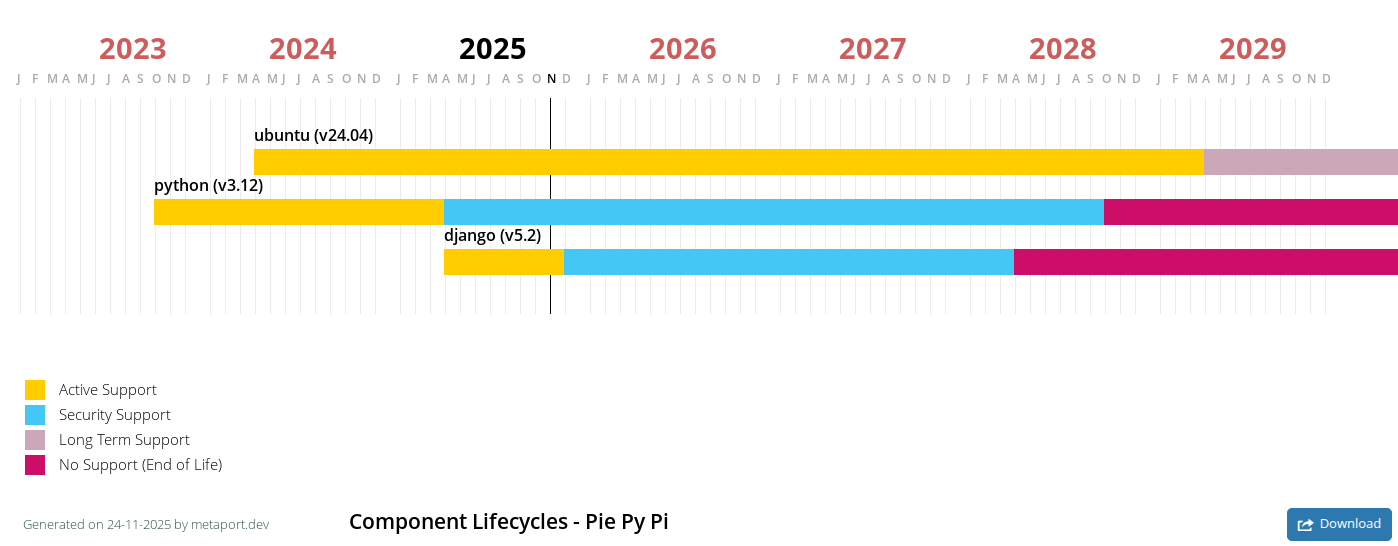
The risk is straightforward. Once security fixes stop at the end of EOS, the software is effectively at end of life in real world terms. Known vulnerabilities stay open, and any new vulnerabilities discovered later won’t get patched. That turns the software into a permanent liability.
This isn’t a theoretical problem. Verizon, a major US communications company, reported in its 2024 Data Breach Investigation Report that security vulnerability exploitation as an initial access method nearly tripled and made up 14% of breaches.
Best Practice
What “best practice” actually covers:
Security: reduce agency and customer exposure to unpatched security vulnerabilities, unsupported software, and supply chain compromises.
Compliance: meet contract requirements for security, business continuity, and supportability. This also makes it easier to proactively recommend the right support contracts to customers before something breaks.
Operations: make changes more predictable, cut down on incidents, and document clear ownership so fixes don’t fall through any cracks.
Cost: plan upgrades instead of scrambling. Whether you use an annual EOL fund, project based remediation, or risk based allocations, you get fewer last minute upgrades and avoid expensive “special” maintenance contracts.
Impact: fewer outages, more reliable performance, and stronger trust between the agency and the customer.
A lot of end of life remediation starts only when something forces the issue, vendor or maintainer notificatins, penetration test findings, media publicised security vulnerabilities, or cloud and platform changes. That’s usually when people start asking about end of life vs end of service life, and realising too late that those dates can occur differently depending on the vendor and the support model in place.
With a bit of upfront discovery, agencies can predict these lifecycle dates and plan mitigation before risk and urgency spike.
Agencies can’t manage what they can’t see, so the first move is to build a complete, living inventory of what’s running and what they depend on.
Agency portfolio list
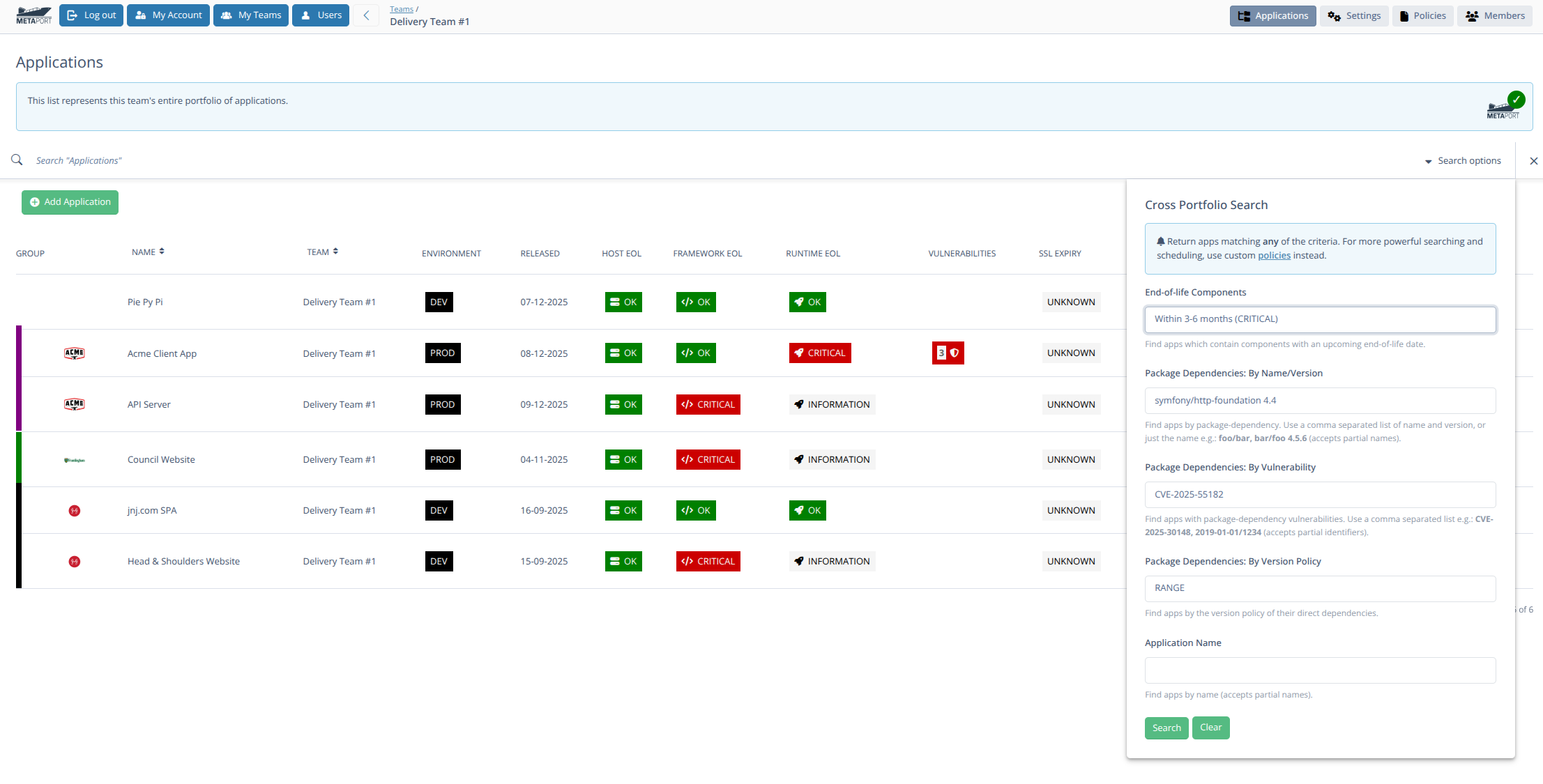
List every managed website and application. Capture its framework version, operating system version, hosting environment, and the end of life vs end of service life dates that apply. Include who owns it, who supports it, and what “done” looks like when an upgrade lands.
Libraries and frameworks
List each site’s and app’s direct and indirect dependencies, known security vulnerabilities, and their respective end of life vs end of service life dates. This is where supply chain risk hides, so don’t stop at top level packages. Array.
Monitored systems
Document how you monitor exposure over time, not just as a one off audit. Enumerate all vulnerability scanning and Software Composition Analysis (SCA) tools which run in code repositories, CI pipelines, and container registries. Track what gets scanned, how often, alert routing, and who’s accountable for remediation.
Risk
Before taking action, agencies first need to determine which of their customers’ managed apps and sites to prioritize, in a process of risk and criticality assessment. This will of course be unique to each agency, but it needn’t be too complicated. An in-exhaustive list of considerations is provided below which when used in conjunction with established prioritization frameworks from e.g. Mozilla and OWASP to name but two, becomes the foundation of a rigorous process:
C&C (Certification & Compliance)
Prioritize apps with existing PCI-DSS, HIPAA, SOC 2, and/or ISO 27001 compliance
Data sensitivity
Prioritize apps which manage PII (Personally Identifying Information)
Prioritize apps representing customers’ businesses (e.g. government vs small business)
Prioritize apps by no. affected users (e.g. all citizens vs a small industry segment)
EOL exposure and component dependencies
Prioritize apps in production vs CI or internal app hosts
Prioritize apps with upstream/downstream components which are or are not under agency control
Prioritize apps with known security vulnerabilities by rating or score: e.g. Severity, EPSS, CVSS or KEV scores
Contract basis
Prioritize apps (and clients) based on Non-Functional Requirements (NFRs) e.g. Return To Operation (RTO), and Recovery Point Objective (RPO)
Prioritize apps (and clients) based on Service Level Agreements (SLAs)
Actions
Understanding and assessing agency-specific risk can be done in isolation, but deciding on a treatment path such as: upgrade, replace, refactor, retire, isolate, or pay for extended support, requires a customer conversation based on an analysis by an expert such as a senior developer:
Upgrade: move to a supported version (often fastest ROI)
Replace: swap product/vendor (common for legacy tools)
Refactor: re-architect code to remove obsolete components
Retire: decommission unused systems (high-leverage win)
Isolate: reduce exposure with segmentation and strict access
Extended support: Purchase LTS or NES (Never Ending Support) licenses 1
In addition to the decision which needs to be made, there are some longer term next-steps which stand agencies in good stead.
Next Steps
Encourage Contracts
While most agencies have their own template T&M, SoW and S&M contracts, they’re not typically well-sold to customers. Customers too can always do even more up-front by specifically asking agencies for security posture evidence, migration references, and concrete SLAs, the latter being especially important for regulated environments and customers e.g. central government.
Set-up Check-ins
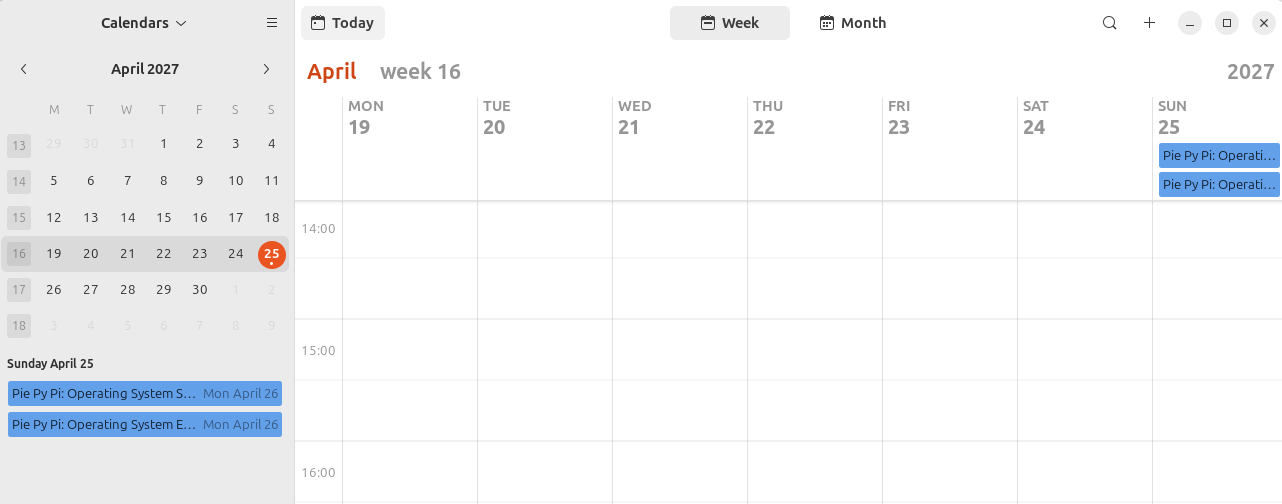
Agencies should have a process for booking regular check-ins for managed applications and customers. Creating an EOL maintenance calendar and road-map aligned to budgets and release cycles in an excellent way to do this. 2
Document Policies
Agencies benefit from having documented internal standards, the benefit being twofold; for the agency itself and its customers, when shared with them:
Production systems must run vendor-supported software and/or N-1 versions
EOL dates will be discussed 12 months prior to elapsed date
Estimates will be provided 12 months prior, so that customers can negotiate budget with adequate notice
Expectations of incident response time, process, recipients, and content
Getting Started
First 30 days
Start with a baseline inventory. Create one shared view of what’s running in production across applications and websites. Then define agency/team policy for “end of life vs end of service life” so everyone in the team uses the same language and the same rules.
Build your first end of life software list and decide what “unsupported” means inside your organisation. For example, does it mean no security patches, no vendor support tickets, no compatible libraries, or all of the above? Identify the top 10 high and critical applications and sites that are already end of life, or soon to be end of life. Create an exception template that requires a clear owner, a reason, compensating controls, and a time-bound expiration date.
Next 60 days
Prioritise and remediate high-risk applications and sites. Focus on what’s internet-facing and what touches sensitive data first. Knock out quick wins, then schedule upgrades that need planning.
Remediate the highest-risk items first. Where upgrades aren’t possible, apply compensating controls and document evidence. That might look like tightening WAF rules, adding CDN protections, restricting access paths, increasing monitoring, and putting extra alerting around known attack patterns. Treat exceptions like a short-term bridge, not a strategy.
By 90 days
Finalise ownership across teams so every application and site has a named accountable owner. Publish dashboards that show what’s end of life, what’s approaching end of life, what’s covered by exceptions, and what’s been remediated.
Set a monthly cadence for review and remediation so this becomes routine operational work, not a once-a-year reactive occurance.
TL;DR
So what are end of life software best practices?
They’re the repeatable program that keeps unsupported software out of production or at least tightly controlled with time-bound exceptions.
And how does end of life software best practice work?
Through continuous discovery, risk-based prioritization, clear decision making, disciplined execution, and measurable activities.
Finally, is end of life software best practice worth it?
For most organizations, yes of course! Locked-in pipelines of upgrade work are gold for agency bottom lines. But it obviously also reduces breach and outage risk, and improves audit readiness, especially on internet-facing and “crown-jewel” systems.
Forewarned is forearmed. Metaport is designed for agencies. It helps them plan EOL dates with their customers, with shared calendars, roadmap gantt charts and automated notifications months, or even years before EOL dates elapse.
Companies like HeroDevs can take over as de-facto maintainer of entire EOL software projects, via a paid NES (Never Ending Support) license.