


What’s a portfolio anyway?
It doesn’t matter if you’re a gargantuan digital agency or just a freelancer. If your customers number in the tens or the thousands, the collection of websites and applications you manage on their behalf represent your portfolio.
Much like a hire car company, the window into your portfolio is the single source of truth that tells you which customer owns which application in your “fleet” - even if that window is provided by a wiki, a CRM, some spreadsheets or someone’s head.
For that hire-car company to run smoothly, it needs to know the condition, road-worthiness, and geographical location of each vehicle. Without that information being readily available to all parts of the business, it’s very hard to reliably hire anything out to a customer.
Digital agencies themselves have been around since at least the mid 90s, so it’s hard to imagine their fleet management models not working working well.
But if that’s the case, why do charts like this exist in the 2020s?
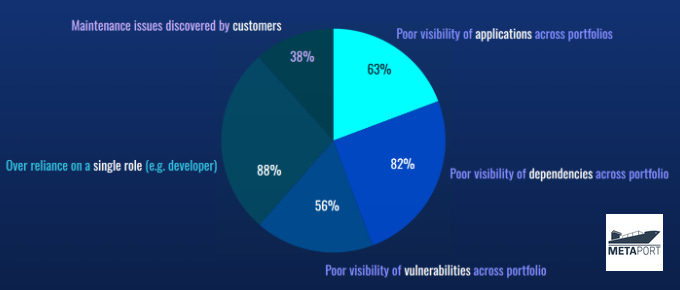
With respect to security vulnerability remediation, dependency management, and end-of-life (EOL) software planning, it appears as though agencies still have some work to do.
How well does your agency respond to maintenance issues and security threats?
Why should portfolios be managed?
If the previous chart needs a summary it’s that agencies don’t appear to have a birds-eye view of their fleet. If they did, you’d expect the numbers to be lower.
If teams can’t easily identify where an application is hosted, the technologies and versions it’s built from, and when dependencies and components need to be updated, it’s an expensive challenge rather than a well-practiced workflow to supply colleagues and stakeholders with timely information for feature development, planning and budgeting purposes.
Keeping on the right side of support contracts is harder too. Upcoming delivery and maintenance work is based on the current state of those applications, which if not known, means it’s also harder to convince customers to sign support contracts.
Security Vulnerability Management
Data-breaches, zero-day exploits, and other internet malfeasance with the potential of harm at a national level now occur every single day to companies somewhere in New Zealand and globally.
Log4Shell - 2021 (Global): 100+ million affected applications and devices
Medicare - 2024 (Australia): 12.4 million individual (people) affected
Shai Hulud - 2025 (Global): 700+ open source JavaScript packages affected
ManageMyHealth - 2025 (NZ): 120,000 personal health records leaked
As an agency, it’s definitely worth asking tough questions like these as often as possible:
“Are we prepared for the next Shai-Hulud style supply-chain attack?”
“How will we identify which of our apps is affected when it happens?”
Your existing security tools will absolutely help you in these situations, but if only a subset of your customers’ apps are hooked-up to them, then you’ll need a plan for effectively attending to the remainder.
Many security tools are designed to be triggered from automated Continuous Integration (CI) pipelines, but for many agencies such setups are still not common.
End of life (EOL) Software Planning
Vendors of licensed software such as Microsoft, Oracle, RedHat, and others, usually have a close relationship with their customers who are tuned into their product announcements.
The same arrangement doesn’t really exist in much of today’s websites and web-applications, built as they are from hundreds of third-party, open source software packages.
A software product’s road-map represents the dates when new features will be added, old ones removed, and legacy versions retired. But for open source maintainers however - whose work is often voluntary and unpaid - the resources don’t exist for road-maps of any kind.
In this scenario, agencies need to take up the slack and monitor their own systems and those of their customers for such maintenance issues on a “best efforts” basis.
And when this happens, some agency blind-spots reveal themselves:
Poor End-of-life (EOL) data availability, so EOL is simply ignored
Security tools focus on individual codebases and container images, not collections
Cyber and DevOps roles leverage technical data, but don’t plan the work, PMs do
When portfolios are managed in part using security tools with a focus on individual “things” - repositories, registries, images - then it is difficult to prioritize and assess risk across portfolios, so what’s an agency to do?
If your agency doesn’t already have a portfolio-wide dashboard, make a start with an application/website inventory. Use wikis, CRMs, or Metaport which is designed for agencies.
Without one, agencies cannot quickly identify when key software components are no longer supported. With this knowledge, cybersecurity risk is reduced because of the advanced notice for replacing unsupported products that are more susceptible to security vulnerabilities.
For legacy application management the OWASP has its own advice, as does this useful one-page Agency End-of-life Survival Guide.
How does your agency do EOL planning? Is it lagging behind, or worse, is it not doing it at all?
So how are agencies managing their portfolios?
An agency business is an outcome orientated organization and outcomes govern an agency’s portfolio management strategy. Some have a customer-first or operational risk perspective, others may be more process, workflow, or revenue driven.
Whichever way your agency does it, it needs to be done with full awareness as to the pros and cons of each approach.
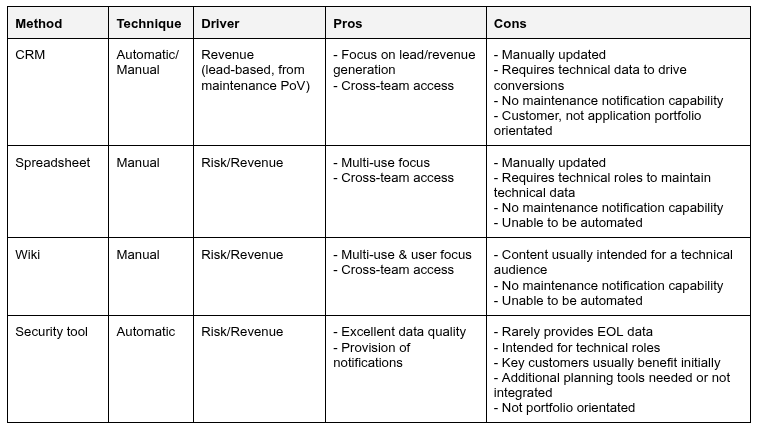
In our previous post Why SCA, SAST, and SBOMs don’t equal EOL planning for digital agencies, we put forward the case for security tooling which represents the business of agencies better.
In this post, we’re also advocating for fleet management tools designed for digital agencies, with the best news of all being that the two are not mutually exclusive.
If you or your agency wants to be the first to know when an agency orientated portfolio management system finally lands, join the waitlist.